
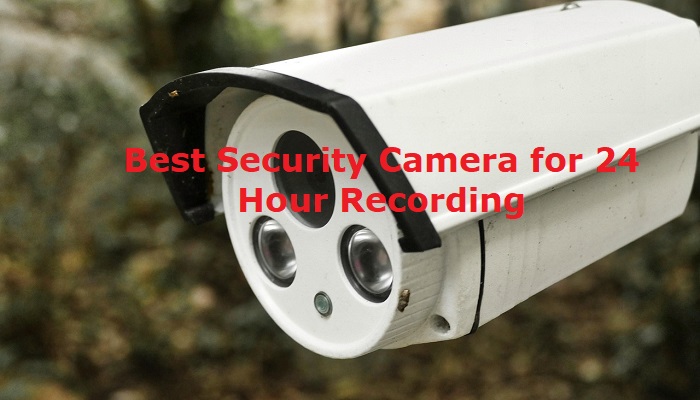
Looking for the best security camera for 24-hour recording? Continuous recording can help you keep a complete record of activity around your home, office, shop, or other property instead of relying only on motion-triggered clips.
In this guide, we compare five security cameras and recording systems that support 24/7 recording, including wired PoE systems, indoor cameras, and wireless options. We evaluate video resolution, storage, power source, night vision, smart detection, installation, and overall value to help you choose the right system for your needs.
Key Features to Look for in a Security Camera With 24/7 Recording
When choosing a security camera for 24/7 recording, continuous recording is only one part of the decision. Video resolution, storage capacity, power source, night vision, viewing angle, weather resistance, and smart detection can all affect how useful the system will be. Consider the following features before choosing a camera for your home, office, shop, or other property.
Viewing Angle and Coverage
A wide viewing angle allows a camera to cover more of an area from a single position. This can be particularly useful for driveways, yards, entrances, shops, and other large spaces. PTZ cameras can provide additional flexibility because they can pan and tilt to monitor different areas. Consider the size and layout of the area you want to monitor before choosing the camera’s field of view.
Video Resolution
Higher resolution can provide more detail when reviewing recorded footage, particularly when identifying people, vehicles, or other objects at a distance. Common options include 1080p, 2K, and 4K. However, higher resolution also requires more storage space and can increase bandwidth requirements for some systems. Choose a resolution that provides enough detail for your monitoring area without unnecessarily increasing storage requirements.
Night Vision
If your camera needs to record around the clock, night vision is essential. Infrared night vision can capture footage in low-light or completely dark conditions, while some newer cameras provide color night vision with additional lighting. Check the manufacturer’s stated night-vision range and consider whether the camera will be installed in a completely dark area or somewhere with ambient lighting.
Storage Capacity
Continuous recording generates much more footage than motion-triggered recording, so storage capacity is an important consideration. Security camera systems may use an NVR or DVR with a hard drive, microSD storage, cloud storage, or a combination of these options. Check how much storage is included and whether the system supports larger drives or expandable storage.
The amount of recording time available depends on factors such as the number of cameras, resolution, frame rate, compression, and recording settings. A higher-capacity drive generally provides more recording time before older footage is overwritten.
Power Supply and Reliability
A camera cannot record continuously if its power source is interrupted. Wired PoE cameras receive power and data through a network cable, while some wireless cameras rely on rechargeable batteries or a separate power adapter. For true 24/7 recording, check whether the camera is designed for continuous power and consider backup power options if uninterrupted recording is important.
Motion and Smart Detection
Smart detection can make recorded footage easier to manage by identifying people, vehicles, animals, or other activity. These features can reduce unnecessary alerts and help you find relevant events more quickly. However, smart detection should complement continuous recording rather than replace it when you specifically need a complete 24/7 video history.
Weatherproofing
Weatherproofing is another important feature of a security camera for 24-hour recording. To ensure your security system can withstand the weather—rain, snow, heatwaves, dust, and debris—look for ones with strong weatherproofing characteristics. An Ingress Protection (IP) rating denotes the degree of dust and water resistance in cameras designed for outside use.
Remote Access and Mobile App
A good mobile app makes it easier to view live footage, review recordings, receive alerts, and manage camera settings remotely. Before buying, check whether the camera supports remote access and whether important features require a subscription or additional service.
Two-Way Audio
Two-way audio allows you to communicate with people near the camera through a built-in microphone and speaker. It can be useful for talking to visitors, delivery drivers, or family members without being physically present.
Quick Picks: Best Security Camera for 24/7 Recording
These five options cover different security needs, from wired PoE systems with dedicated NVR storage to indoor and wireless cameras. Your best choice will depend on the area you need to monitor, how much footage you want to retain, and whether you prefer local or cloud-based storage.
| Brand & Model | Best For | Resolution | Storage | Recording | Check Price Amazon |
| REOLINK 8CH RLK8-520D4 | Best Overall | 5MP (2560 × 1920) | 2 TB | 24/7 | Check Price |
| REOLINK 4K RLK16-800B8 | Best for Multiple Cameras | 4K / 8MP (3840 × 2160) | 4TB | 24/7 | Check Price |
| Google Nest | Best for Indoor Camera | 2K HDR | up to 10 days | 24/7 | Check Price |
| Best for AI Tracking |
4K UHD |
2TB HDD |
24/7 | Check Price | |
| Arlo Pro 4 Spotlight | Best Wireless Option | 2K HDR | Cloud / Local* | 24/7 | Check Price |
Best Security Camera For 24-Hour Recording in 2026
Whether to protect your outdoors, shops, offices, or the inside of your home, a camera with 24-hour recording is important. When it comes to 24-hour recording surveillance cameras, there are many choices, but not all are worth the money.
After researching and comparing a wide range of security cameras and recording systems, we selected these five options based on continuous recording capability, video quality, storage, installation, smart features, and overall value.
1. REOLINK 8CH RLK8-520D4: Best Overall
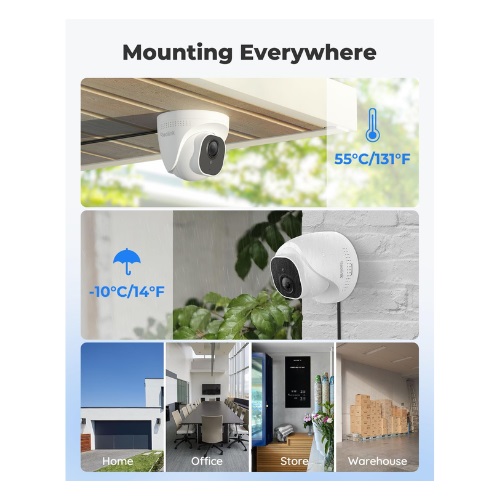
The Reolink RLK8-520D4 is a 4-camera PoE security system designed for continuous 24/7 recording. Each camera captures 5MP video at up to 30 frames per second, while the included 2TB hard drive provides local storage for recorded footage. The system is a strong choice for homeowners and small businesses that want reliable continuous recording without depending on a cloud subscription.
What makes the RLK8-520D4 stand out is its combination of local storage, PoE connectivity, 5MP video, and continuous recording. The cameras connect directly to the NVR through Ethernet cables, providing both power and video transmission through a single cable. This makes it particularly suitable for users who want a dedicated wired security system for around-the-clock monitoring.
Key Features
- 4 × 5MP PoE security cameras
- 2560 × 1920 video resolution
- 24/7 continuous recording
- Pre-installed 2TB HDD
- Storage expandable up to 16TB
- Up to 100ft infrared night vision
- Person, vehicle, and animal detection
- PoE plug-and-play installation
- Built-in microphones for audio recording
- IP67 weather-resistant cameras
- No monthly fee for smart detection features
Pros
- 5MP video quality
- 4-camera system
- True 24/7 local recording
- 2TB HDD included
- Storage expandable up to 16TB
- 100ft infrared night vision
- Person, vehicle, and animal detection
- PoE installation reduces cable requirements
- IP67 weather resistance
- No monthly fee for smart detection
Cons
- Wired installation requires Ethernet cabling
- 2TB storage can fill faster with continuous recording
- Requires an NVR rather than functioning as a simple standalone camera
- Less convenient to relocate than wireless cameras
Final Verdict
The Reolink RLK8-520D4 is an excellent choice for users who want reliable 24/7 recording with local storage and a dedicated wired security system. Its 5MP cameras, 2TB HDD, PoE setup, smart detection, and 100ft night vision provide strong coverage for homes and small businesses. However, the wired installation makes it less convenient for users who prefer a simple wireless security camera.
2. REOLINK 4K 16CH RLK16-800B8: Best for Multiple Cameras
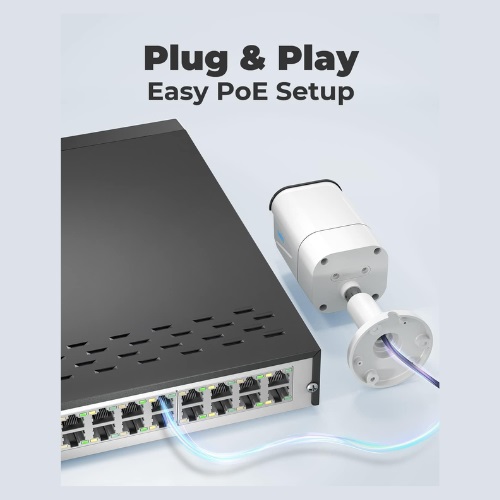
The Reolink RLK16-800B8 is a 16-channel 4K PoE security camera system designed for users who need broader coverage and continuous 24/7 recording. It includes 4K 8MP cameras, a pre-installed 4TB hard drive, and a 16-channel NVR, making it a strong choice for larger homes, offices, shops, and other properties that require multiple cameras.
The main advantage of the RLK16-800B8 is its combination of 4K video quality, local storage, and a 16-channel PoE NVR. The system can record continuously without requiring a monthly cloud subscription, while the NVR provides room for additional compatible cameras as your surveillance needs grow.
Key Features
- 4K 8MP security cameras
- 3840 × 2160 video resolution
- 24/7 continuous recording
- Pre-installed 4TB HDD
- Storage expandable up to 16TB
- 16 PoE camera ports
- Up to 100ft infrared night vision
- Person, vehicle, and motion detection
- H.264/H.265 video compression
- Built-in camera microphones
- IP67 weather-resistant cameras
- PoE plug-and-play installation
Pros
- 4K 8MP video quality
- 16-channel NVR
- 4TB HDD included
- 24/7 continuous recording
- Storage expandable up to 16TB
- Up to 100ft night vision
- Person and vehicle detection
- 16 PoE ports for a larger camera system
- IP67 weather resistance
Cons
- Wired installation requires Ethernet cabling
- More expensive than smaller 4-camera systems
- NVR setup may be more than needed for small properties
- Continuous 4K recording can consume storage quickly
Final Verdict
The Reolink RLK16-800B8 is an excellent choice for larger properties that need multiple cameras and reliable 24/7 recording. Its 4K video, 4TB local storage, 16-channel PoE NVR, and expandable design provide plenty of flexibility for comprehensive surveillance. However, its wired installation and larger NVR setup may be excessive for users who only need one or two cameras.
3. Google Nest: Best for Indoor Camera
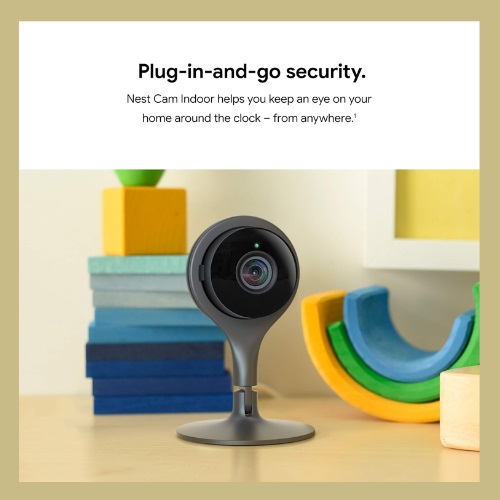
The Google Nest Cam Indoor is a compact wired indoor security camera designed for continuous monitoring and smart activity detection. The current wired model provides 2K HDR video, a 152° diagonal field of view, night vision, intelligent alerts, and two-way audio. For users who specifically need 24/7 recorded video history, Google’s Advanced plan is required and provides up to 10 days of continuous video history.
Google Nest Cam indoor camera uses industry-leading security technology to protect your data and assets. The Nest Cam Indoor stands out for its smart-home integration and easy indoor setup rather than local NVR storage. It works through the Google Home app and can provide intelligent alerts for people, animals, and vehicles. Its wide 152° field of view also makes it useful for monitoring larger indoor areas from a single camera.
Key Features
- 2K HDR video
- 152° diagonal field of view
- Up to 30fps video
- Night vision with HDR
- 6× digital zoom
- Intelligent alerts for people, animals, and vehicles
- Activity Zones
- Two-way audio with noise cancellation
- Google Home app integration
- 24/7 live view
- Powered by a USB cable and a power adapter.
Pros
- 2K HDR video quality
- Wide 152° field of view
- Intelligent person, animal, and vehicle detection
- 24/7 live view
- Up to 10 days of continuous video history with the Advanced plan
- Easy Google Home integration
- Two-way audio
- Activity Zones
- Compact indoor design
Cons
- 24/7 recorded video requires a paid Advanced subscription
- Video history is cloud-based rather than local NVR storage
- Designed for indoor use
- Wired power is required for continuous recording
Final Verdict
The Google Nest Cam Indoor is a strong choice for users who want an easy-to-use indoor camera with smart detection and Google Home integration. Its 2K HDR video, wide field of view, and intelligent alerts make it useful for everyday indoor monitoring. However, 24/7 recorded video history requires the Google Home Premium Advanced plan, so it may cost more over time than a local NVR system.
4. eufy Security PoE Bullet-PTZ: Best for AI Tracking
The eufy 4K Triple-Lens Bullet-PTZ Camera combines a 4K wide-angle camera with a 2K PTZ camera to provide broad coverage and intelligent tracking. The upper camera offers a 122° fixed view, while the lower PTZ camera provides 360° pan coverage and 8× auto-zoom, making it a strong option for monitoring larger outdoor areas and following moving subjects.
The main advantage of this eufy system is its combination of wide-area coverage, automatic tracking, local AI processing, and 24/7 NVR recording. The included 2TB HDD provides local storage, while features such as cross-camera tracking, auto-framing, and subscription-free smart video search make it particularly useful for users who want more intelligent surveillance without relying entirely on cloud storage.
With face recognition, this function enables your security system to reach its maximum potential by differentiating between recognized family members and outsiders or unknown people. It streamlines the procedure for monitoring and analyzing activities, guaranteeing prompt and efficient surveillance throughout your security network.
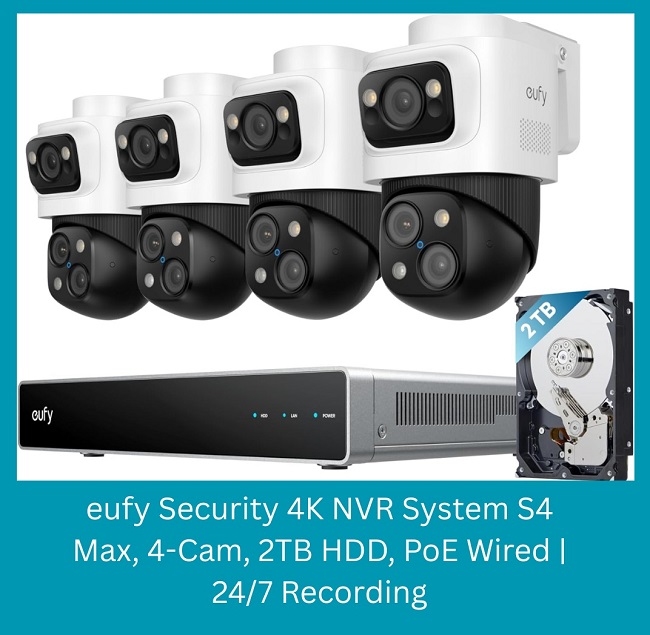
Key features
- K + 2K dual-camera system.
- 360° PTZ coverage.
- Auto-framing and tracking.
- Up to 164 ft tracking distance.
- Cross-camera tracking.
- Local AI processing.
- Smart video search.
- 2TB local storage.
- Expandable NVR system.
- PoE connectivity
Pros
- 4K + 2K dual-camera design
- 122° wide-angle view
- 360° PTZ with 8× auto-zoom
- AI-powered auto-tracking and auto-framing
- Live cross-camera tracking
- Local AI processing
- 2TB pre-installed HDD
- Expandable storage up to 16TB
- Subscription-free smart video search
- PoE plug-and-play setup
Cons
- PoE switch required for expansion beyond 8 channels
- Each Bullet-PTZ camera uses two NVR channels
- More complex than a basic security camera
- Requires an updated eufy app for full system compatibility
Final Verdict
The eufy 4K Triple-Lens Bullet-PTZ Camera is a strong choice for wide-area monitoring and intelligent tracking. Its 4K + 2K cameras, 360° PTZ, AI tracking, local storage, and subscription-free video search offer excellent features. However, its advanced NVR setup may be more than needed for users looking for a simple standalone security camera.
5. Arlo Pro 4 Spotlight: Best Wireless Option
The Arlo Pro 4 is a wire-free security camera designed for users who want flexible installation without running Ethernet cables. It records in 2K HDR and includes features such as color night vision, a wide viewing angle, motion detection, and two-way audio, making it a convenient option for monitoring areas where a wired camera system may be difficult to install.
The main advantage of the Arlo Pro 4 is its wireless design, which makes it easier to install and reposition than a traditional PoE security camera. It is a good choice for users who prioritize installation flexibility and smart security features, although users specifically looking for continuous 24/7 recording should carefully check the required power setup, subscription, and recording options before choosing it.
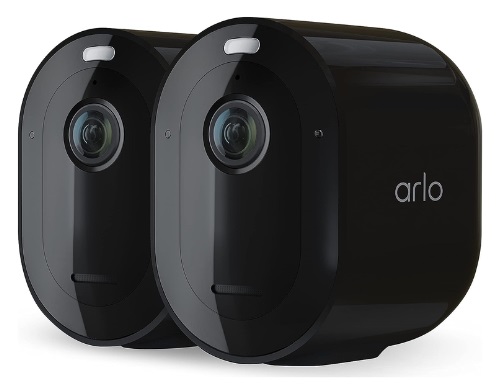
Key Features
- It has a 160-degree diagonal viewing camera.
- It is a wireless camera that sets up quickly.
- Doesn’t need a cable or a hub.
- Provides a 2K crystal clear resolution.
- Works with most of the smart home devices.
Pros
- Aesthetic design with a robust build.
- No need for any wires to connect.
- Comes at a reasonable price.
- Works with many third-party home automation devices.
Cons
- For cloud storage, you will need a paid subscription.
Final Verdict
If you are tired of using wires hanging around with your 24-hour recording security cameras, then the ARLO Pro 4 is for you. This is a completely wireless camera that works with a battery and has many unique features. Comparing the price point, you will have a decent 2K picture quality, along with features like spotlight and wide-angle view.
How to Choose a Security Camera for 24/7 Recording?
Choosing a security camera for 24/7 recording involves more than looking at video resolution. You also need to consider how the camera is powered, where recordings are stored, how much footage you need to retain, and whether the system can handle the area you want to monitor. Consider these factors before making your decision.
Decide Between Wired and Wireless
For continuous recording, a reliable power source is essential. Wired PoE cameras are generally well suited to 24/7 recording because they receive power and data through an Ethernet cable. Wireless cameras can offer easier installation and greater flexibility, but you should check whether the specific model supports continuous recording and whether it requires a subscription or additional power source.
Check the Recording and Storage Method
Find out where your recorded footage will be stored before buying. Security cameras may use an NVR or DVR, microSD card, cloud storage, or a combination of these options. Local storage can provide greater control over your recordings, while cloud storage makes remote access convenient. For continuous recording, make sure the storage capacity is sufficient for the number of cameras and the amount of footage you want to keep.
Choose the Right Video Resolution
Higher resolution can provide more detail when reviewing recorded footage, especially when identifying people or vehicles. 1080p may be sufficient for basic monitoring, while 2K and 4K cameras can provide greater detail. Keep in mind that higher-resolution continuous recording requires more storage space.
Consider Night Vision
If you need protection around the clock, the camera should provide reliable footage in low-light conditions. Check the stated night-vision range and consider whether you need infrared or color night vision. Outdoor cameras may also benefit from additional lighting or a suitable installation position.
Check the Field of View
A wider field of view allows one camera to cover more of an area. Consider the size and shape of the location before choosing a camera. PTZ cameras can provide additional flexibility because they can pan, tilt, and zoom to monitor different areas. For large properties, multiple fixed cameras may provide more consistent coverage than relying on a single camera.
Look for Smart Detection Features
Person, vehicle, and animal detection can make continuous recordings easier to review by helping you identify important events. Some systems also offer activity zones, automatic tracking, and smart search. These features are useful for finding relevant footage, but they should complement continuous recording rather than replace it when you need a complete video history.
Consider Weather Resistance for Outdoor Cameras
If you plan to install the camera outdoors, check its IP rating and operating temperature range. A weather-resistant camera can provide better protection against rain, dust, and other environmental conditions. The camera should also be positioned where it has a clear view while remaining protected from unnecessary exposure.
Check Subscription Requirements
Some security cameras offer basic recording features without a subscription, while advanced cloud recording, longer video history, or additional AI features may require a paid plan. Check the manufacturer’s current subscription requirements before buying, particularly if you specifically need 24/7 recorded video rather than simple live viewing or motion alerts.
Think About Future Expansion
If you are securing a large home, office, shop, or other property, consider whether you may need additional cameras later. An NVR with extra channels can make it easier to expand a wired system, while a wireless camera system may offer greater flexibility for adding individual cameras. Choosing an expandable system can save you from replacing the entire setup later.
For most users who prioritize reliable 24/7 recording, focus first on continuous power, dependable storage, appropriate video quality, and night vision. After those essentials, consider smart detection, remote access, PTZ tracking, two-way audio, and other convenience features based on your specific needs.
FAQs About 24/7 Security Camera Recording
Security cameras with 24-hour recording are important devices when it comes to improving your home and office security. So, this shouldn’t be taken lightly. If you are still having questions about the best security camera for 24-hour recording, keep reading the FAQs below.
Do I need a security camera for 24-hour recording?
Of course, you need a security system for 24-hour recording. If you want to ensure physical security at any position in your home or office, then a camera is a must that records 24/7.
Do security cameras record continuously?
Yes, security cameras can record continuously. By the by, security camera systems have several recording options such as continuous recording, schedule-based recording, and motion-triggered recording. So, you can configure and buy the camera according to your needs.
Which security cameras can record 24/7?
If you are looking for continuous recording cameras that record 24/7, there are many brands on the market. But the best security cameras that record 24/7 with good resolution and an affordable budget are REOLINK, Google Nest, and Eufy 24/7.
Do security cameras record all day?
The answer is Yes and No. The security cameras can record all day long, but it is noted that not all security cameras can record all day. Some cameras record only at the scheduled base, and others only when alerts are triggered or motion is detected.
How much storage do I need for 24-hour security camera recording?
The required storage depends on the number of cameras, video resolution, frame rate, compression, and how long you want to keep the footage. Higher-resolution cameras and multiple-camera systems require more storage. For continuous recording, an NVR or DVR with a larger hard drive is generally more suitable than relying on a small memory card.
The amount of storage, or GB, depends on the camera’s resolution. For example, if a camera records 24-hours with 1080p resolution, then it may require 60GB or more of storage. So, around 1.8TB of storage space is needed for a month.
Can security cameras record 24-hours a day without any restrictions?
Yes, many security cameras are designed in such a way that they can continuously record for 24-hours, considering there is enough storage and an unrestricted power supply.
However, there can be issues with data management as continuous recording produces a lot of data, and the system can hang up managing this vast amount of data.
How long will 2TB last on a security camera with 24-hour recording capacity?
A security camera that records constantly for 24-hours can use a 2TB storage for a certain amount of time, depending on things like compression and video quality.
With effective compression and ordinary to high-quality footage (720p to 4K), a 2TB storage might typically sustain a single camera for seven to thirty days. Using motion-triggered recording and adjusting parameters can affect how long the storage will last.
Can I do continuous recording using cloud storage options?
For continuous recording, some cameras offer cloud storage; however, in most cases, this requires a membership fee dependent on the storage capacity. Ensure the camera can record continuously in the cloud without any restrictions.
Do security cameras need Wi-Fi for 24/7 recording?
No. A security camera does not necessarily need Wi-Fi for continuous recording. Wired PoE cameras can send video directly to an NVR through Ethernet cables, allowing them to record locally without relying on Wi-Fi. Some wireless cameras, however, depend on Wi-Fi for video transmission and remote access.
Can security cameras record at night?
Yes. Security cameras equipped with infrared or color night vision can continue recording in low-light or dark conditions. When choosing a camera for 24/7 surveillance, check its night-vision range and whether the camera is suitable for the lighting conditions at your installation location.
Read more
- Best gaming computer in 2026.
- Best firewall for businesses in 2026.
- Best server for home lab in 2026.
Final Words
Choosing the best security camera for 24/7 recording depends on your property, storage needs, installation preferences, and budget. The Reolink RLK8-520D4 is our Best Overall choice for reliable local recording, while the RLK16-800B8 is better suited to larger properties that need multiple cameras.
For indoor monitoring, the Google Nest Cam Indoor offers smart features and Google Home integration, while the eufy 4K Triple-Lens Bullet-PTZ stands out for AI tracking and wide-area coverage. The Arlo Pro 4 is a good option for users who prioritize wireless installation and flexibility.
Before buying, focus on continuous power, storage capacity, video quality, night vision, and the actual recording method. If you need dependable 24/7 recording without relying heavily on cloud services, a wired PoE system with an NVR is generally the strongest option.