

The best server for home lab in 2026 is DELL PowerEdge R810, HPE ProLiant ML350, HP DL360 G9, QNAP TS, Dell PowerEdge T40, and HPE ProLiant ML30. The server can be a great way to experiment with different tools, applications, and networking devices in your home.
However, this process requires the use of good-quality servers. It is a lovely alternative if you want to work in the IT industry professionally without paying thousands of dollars. Continue reading to discover the best home lab servers.
What is Home Lab Server?
A home lab server is a computer that is utilized for educational purposes, experimentation, testing, and the operation of services. A home lab is a private, off-the-shelf space where you can test new technology. Home lab servers are personal computers modified for use in a home setting. They are like tiny versions of professional-grade servers.
This lab can be used for various tasks, such as media file storage and providing a stable testing environment for DevOps processes. You can use any OS, program, and collection of tools to configure your home lab as you see fit.
Central processing units (CPUs), random-access memory (RAM), storage drives (HDDs or SSDs), and network interfaces are common parts of these servers. You are free to choose or alter these hardware requirements in accordance with your unique requirements and financial limitations.
The home server lab is seamlessly incorporated into the home network, allowing it to communicate with other gadgets such as laptops, cellphones, and Internet of Things devices. Home lab servers are excellent resources for practical learning.
They provide customers with the flexibility to test different operating systems, connectivity settings, security setups, and software installs without worrying about negatively impacting production environments.
Networking settings enable customized connection and resource usage by giving users control over how the server communicates with other servers on the local network and the wider internet.
Best Server for Home Lab in 2026
If you are looking for a home server and you feel it is very difficult to find one, don’t worry, we’re here to help you. After our deep research to find the best servers for the home lab, we picked out 8 servers that we believe are the best in the market. So, keep on reading to know more about these servers.
- Best Server for Home Lab: DELL PowerEdge R810
- Best Server for Home Use: HPE ProLiant ML350
- Best Server for VMware Home Lab: HP DL360 G9
- Best Mini Server for Home Lab: QNAP TS
- Best Tower Server for Home Lab: Dell PowerEdge T40
- Best Computer for Home Server: HPE ProLiant ML30
- Best server for Home Network: HPE DL160 G10
- Best Dell Server for Home Lab: Dell EMC R640
1. Best Server for Home Lab: DELL PowerEdge R810
The DELL PowerEdge R810 Server is the best server for home lab in 2026, which is professionally inspected and tested by experts. This is specially used for servers, and its hardware configuration is ideal for home lab servers.
This is a certified and refurbished product on our list, and it will be a good deal for your home lab at an affordable price. It comes with a 2.4 GHz Intel Xeon processor, 600 GB HDD, and 128 GB DDR3 SDRAM, so these configurations run your applications and services smoothly.
The DELL PowerEdge R810 Server is a rack-mounted server that can create a VM lab environment, and it has massive resources to run multitasking. So, you may consider setting up this server for your home lab without any hesitation.

Key Features
- Powered by a 4 GHz processor.
- Comes with 128 GB DDR3 SDRAM.
- 600 GB HDD.
- RAID Controller.
- 4X E7-4870 40 Cores.
Pros
- Reasonable price.
- Suitable for multitasking.
- Reliable hardware.
- Excellent RAM Power
- Optimal Storage Options
Cons
- Need to buy an Ethernet extender for WiFi.
Final Verdict
If you are looking for a durable and scalable home lab server at an affordable price, then the DELL PowerEdge R810 Server is the best one for you.
2. Best Server for Home Use: HPE ProLiant ML350
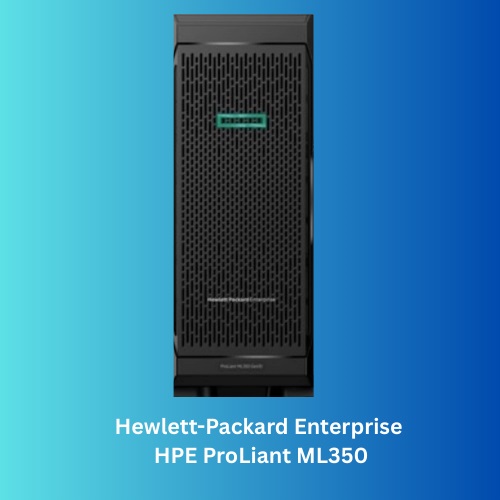
This is another best servers for home use. This server is known as a dual-socket server tower because it frequently operates storage and services in distant branch offices without access to racks.
The HPE ProLiant ML 350 Gen 10 comes with a 2.3 GHz Intel Xeon Gold 5218 CPU. This server has remarkable processing capability that can easily handle a wide range of activities.
Moreover, the expandable option is also a great feature. By using HPE’s standard 8+8+8 drive bay arrangement, the ML350 Gen10 can update its single SFF hot-swap cage to hold up to 24 drives in three blocks.
Its dependability and sturdy construction are two of its most notable qualities. The Gen10 High-Performance model lives up to the status of being one of the most durable models in the HPE ProLiant line.
Additionally, it has cutting-edge management capabilities, such as HPE’s iLO (Integrated Lights Out) technology, which allows for remote oversight and administration, resulting in less downtime and effective troubleshooting.
Key Features
- Powered by Xeon Gold 5218 Processor.
- It includes management tools from HPE.
- Effective tracking and management of servers.
- Has 32 GB of installed RAM.
- Dual socket tower server.
Pros
- The processor is very powerful.
- Provides very high speed.
- Has a simple and sophisticated design.
- There are many different storage options.
- Has huge expandability options.
Cons
- You may need a cooler for upgrades.
Final Verdict
The HPE ProLiant ML350 Gen10 High-Performance Tower Server is a heavy-duty server that comes with a powerful processor and huge expandability options. Its dual-socket server tower offers great ease of access for your home lab and offices.
3. Best Server for VMware Home Lab: HP DL360 G9
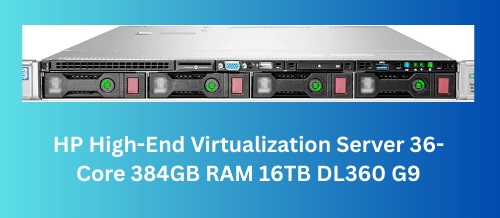
HP Proliant DL360 G9 4-Bay is the best server for a VMware home lab at an affordable price. It is specially used for home lab virtualization and is dedicated to providing high-performance computing with efficient power Consumption.
It is powered by a 2.1 GHz Intel Xeon 18-Core CPU (36-Cores Total) processor with 384 GB DDR4 faster memory. The server includes 4x 4TB 7.2K SATA 3.5″ HDD, so you can store an ample amount of files, documents, and applications.
Key Features
- It is powered by a 1 GHz Intel Xeon 18-Core CPU.
- 4x 4TB 7.2K SATA 3.5″ HDD.
- 384 GB DDR4 faster memory
- High resolution (3840 x 2160).
- Dedicated graphics card.
- Virtualization home server.
Pros
- Budget-friendly.
- Powerful specifications with 36 cores.
- Energy-efficient.
- Run with multiple VMs.
- Reliable server.
- Ample Storage.
Cons
- Hard drives may fail.
Final Verdict
If you are looking for a powerful, reliable, and virtualization server for your home lab, then the HP Proliant DL360 G9 4-Bay is the best one at an affordable budget. The server will be a great addition to your home lab for virtualization purposes.
4. Best Mini Server for Home Lab: QNAP TS
This is the best mini server for home labs that are looking for a compact device for their complete setup. Excellent hardware is included with the QNAP TS-h973AX-8G server. The specifications are excellent, and the device control and caching options are a great deal.
A high-capacity NAS (Network Attached Storage) device built for demanding storage requirements is the QNAP TS-h973AX-8G. It is appropriate for both personal and corporate usage because of its 9-bay layout, which provides enough room for storing enormous quantities of data.
Its connection choices are among its most notable qualities. Fast connections are essential for high-performance data access and transfer, and this NAS has both 10GbE and 2.5GbE ports.
These features support essential operations such as virtualization, which includes file servers, group video editing, and effective backup and recovery of data. With its business-grade performance, dependability, and affordability, it’s the perfect option for a variety of applications that demand the best possible data protection and management.

Key Features
- Enough storage space
- It is provided by the 9-Bay configuration.
- AMD Ryzen Embedded V1500B quad-core
- 2 GHz processor.
- Has 8 GB DDR4 RAM.
- Type-A and Type-C USB 3.2 Gen2.
Pros
- It offers versatile connectivity to 10GbE/2.5GbE ports.
- Make sure your data stays protected.
- Has the option to extend the RAM up to 64 GB.
- The transfer speed is very high.
Cons
- The setup and configuration are complex.
Final Verdict
A powerful NAS that meets the demanding requirements of home lab setups is the QNAP TS-h973AX-8G. Because of its many connectivity choices, sophisticated QuTS Hero OS, and expandability, it’s a great solution if you need a lot of storage, fast networking, and strong data management.
5. Best Tower Server for Home Lab: Dell PowerEdge T40
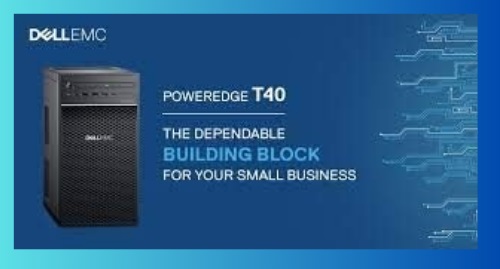
The Dell PowerEdge T40 is a reliable and best tower server for home labs and an entry-level server suitable for small businesses and home offices seeking a dependable computing solution. It’s powered by the Intel Xeon 3.5 GHz E2224G processor.
Although it lacks a few premium capabilities and has trade-offs that allow Dell to compete fiercely on price, it is intended to be an entry-level server for SMB, SOHO, and edge computing markets.
This is the best server for home lab in 2025, which offers a good foundation for small-scale operations, with 8GB of RAM and a 1TB hard disc. In the event of a drive failure, a certain amount of fault tolerance is ensured by adding flexibility and data redundancy provided by DVD-RW and assistance for RAID 5.
Furthermore, as this is a server built on a workstation architecture, the front of the machine has four USB ports, including a USB 3.0 and Type-C connector. So, you can stay assured you will never run out of connectivity options.
Key Features
- It comes with an Intel Xeon 3.5 GHz E2224G processor.
- Offers RAID 5 support.
- Comes with an included DVD-RW drive.
- Has 8 GB storage and 1 TB storage.
Pros
- Offers both PCIe and PCI expansion slots.
- The tower design is quite compact.
- Includes a 3-year warranty.
- Comes at a reasonable price.
Cons
- Not suitable for high-level professional work.
Final Verdict
If you are in search of an entry-level server under budget, then the Dell PowerEdge T40 is the best choice for you. It is a suitable choice if you are just getting started with the home lab system and looking at basic work.
6. Best Computer for Home Server: HPE ProLiant ML30
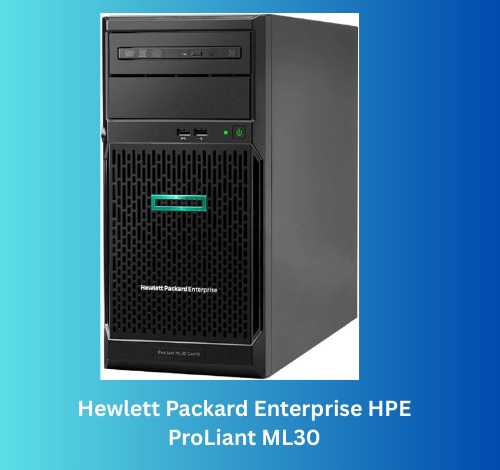
HPE ProLiant ML30 G10 Plus is the best computer for home servers. This computer server is specially used for homes, small businesses, and remote offices. The server is easy to access and store because there is no need to place it on the rack.
The ProLiant ML30 G10 Plus comes with an Xeon E-2314 4-Core 2.8GHz 8MB CPU (up to 4.5GHz), which can run multiple applications and smoothly handle a wide range of activities.
One of the important key points of this computer server is ensuring physical and internal security because of the Padlock eye, Bezel Lock, and Kensington security slot.
It has 32GB (2 x 16GB) DDR4 PC4-25600 3200MHz unbuffered memory to provide a faster speed. The server is included with 16TB (4 x 4TB) SATA III 6 GB/s SSD for an Ultra-Fast storage server RAID Controller.
Key Features
- It is powered by Xeon E-2314 4-Core 2.8GHz 8MB CPU.
- 32GB (2 x 16GB) DDR4 memory.
- 16TB (4 x 4TB) SATA III 6 GB/s SSD
- Remote Access.
- USB Ports: 4 USB 3.0 Ports.
- Physical and internal Security.
- Internal Slots: 4 PCIe expansion slots, M.2 slot.
Pros
- The processor is very powerful.
- Providing faster speed.
- Compact design.
- Portable server.
- Many different storage options.
- Ensure Physical and Internal Security.
Cons
- Hard drive installation is required.
Final Verdict
The HPE ProLiant ML30 G10 Plus is a heavy-duty computer server that comes with a powerful processor and 16TB (4 x 4TB) SSD for storing large data and files. If you are looking for a computer server for a home lab, the HPE ProLiant ML30 G10 Plus is the perfect one.
7. Best server for Home Network: HPE DL160 G10
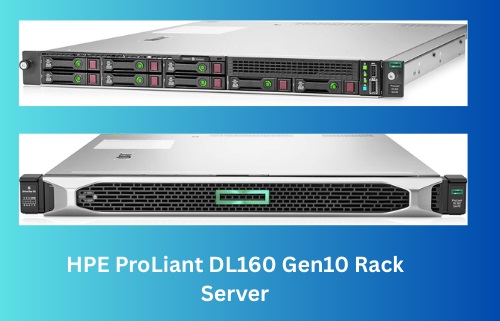
This is the best server for a home network and is powered by the Xeon 4208 processor. This little 1U server has the same build quality and aesthetic that HPE is known for. Every drive is loaded starting at the front.
The ID card is located in the center of the front panel, whereas the power button, USB 3.0 port, ILO port, and LED indicators are located on the right side. This home server, which has an Intel Xeon Silver 4208 CPU, offers a strong platform for even more demanding applications.
Furthermore, it offers flexibility in balancing speed and storage capacity depending on particular demands, thanks to its 16GB of RAM and support for HDD and SSD storage options.
Storage device communication is made possible via the Serial ATA/600 Controller, which guarantees effective data transfer speeds.
The board also offers access to a secondary slot for additional Smart Array choices and a bay for BBU, in addition to the conventional version’s Smart Array S100i SR software controller.
Key Features
- Includes Gigabit Ethernet & 8 x SFF.
- Powered by the Xeon Silver 4208 Processor.
- Integrated with a 16 MB graphics card.
- Has 16GB RAM & HDD SSD.
Pros
- Offers support for 2 processors with one installed processor.
- Has a compact design
- Eight Small Form-factor drive bays
- Offer a range of storage options.
Cons
- The 16 MB graphics card may be too low for graphics-intensive work.
Final Verdict
For those who want a powerful, small server that can scale, the HPE ProLiant DL160 G10 is the best server for home lab enthusiasts. Its capability for two processors, large RAM capacity, and several storage bays provides flexibility and expandability, meeting a range of workloads and rising needs.
8. Best Dell Server for Home Lab: Dell EMC R640
This is the best Dell Server for home lab, which provides individuals in home labs looking for significant processing power and storage capacity with a reliable and affordable option.
This is the only refurbished product on our list, but as this is a certified refurbished product, it’s a good deal. Otherwise, it would be impossible to find this at such a price.
In a home lab setting, two Intel Xeon Gold 6130 2.1GHz 16-core processors of the Dell EMC PowerEdge R640 offer substantial processing power for multitasking, virtualization, and heavy tasks.
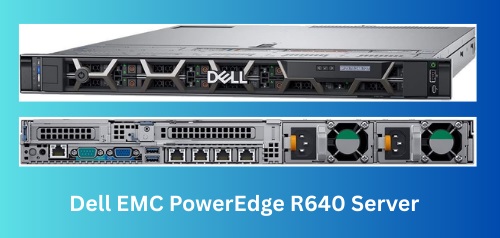
The 1U server has a stylish bezel and an incredibly customizable mechanism behind that bezel. So, it gives you the freedom to customize in your own way.
This server package also has amazing storage and processing capability, but prospective customers should ensure it will work for their planned use cases and consider their demands.
Key Features
- Includes dual Intel Xeon Gold 6130 16-core processor.
- Comes with 64GB DDR4 RAM.
- Dell PERC H740P NV Cache 8GB RAID Controller.
Pros
- Comes at a reasonable price.
- Robust processing capabilities suitable for multitasking.
- Options for scalability.
- Has a compact design.
Cons
- The design may not be compatible for everyone.
Final Verdict
With its two Intel Xeon Gold processors, the Dell EMC PowerEdge R640 Server Bundle is an attractive option for anybody looking for a strong and scalable home lab server. It provides significant processing power and storage capacity appropriate for virtualization, multitasking, and a range of tasks in the home.
Best Server For Home Lab 2026: Buying Tips
Designing your first home lab can always be confusing, as it involves a lot of different factors, and choosing the right server can be the most daunting task. So, we have designed the buying guide below in such a way that it will help you make the best server for your home lab without much hassle.
Form Factor
The first aspect to consider is the form factor: Rack or Tower. Tower servers are practical and simple to operate, making them perfect for configurations in which rack installation is not an option.
Because they are often quieter and blend in well with a variety of situations, they are appropriate for use in offices or homes. Moreover, these servers make maintenance and upgrading easier since they are accessible and easy to use.
Rack servers, on the other hand, are made to be both scalable and space-efficient. They are ideal for configurations where future growth is expected.
In a dedicated server room or data center, rack-mounted servers are better organized and conserve floor space. For bigger systems, they provide improved cable management and ventilation.
Workloads
Another thing to consider is the workload; the type of server you need highly depends on the workload. The resources required for various lab activities vary, and knowing these requirements makes setup optimization easier.
A mid-range CPU is frequently sufficient for activities like creation, evaluation, virtual machine running, and software experimentation. Cost and performance must be balanced in these situations.
Choosing a mid-range CPU allows you to save money while having enough power to do these typical home lab tasks.
Processor
This is another important consideration when buying the best server for home lab. Modern CPUs with many cores should be given priority when choosing a processor for your home lab server. For most home labs, a dual- or quad-core CPU is more than enough. For activities that don’t require a lot of multithreading, take into consideration CPUs with higher clock rates.
Performance is improved by systems that enable cores to manage numerous threads, such as SMT and Hyper-Threading. For quicker data access, use CPUs with bigger cache capacities. Strong choices appropriate for server tasks are provided by AMD EPYC, high-end AMD Ryzen/Threadripper CPUs, and Intel Xeon (E-2100, Silver, Gold series).
Budget
Budget is another consideration you must think of when looking for the best servers for the home lab. Investing in a faster processor and more RAM can be expensive, but this will ensure higher work efficiency and faster processing speeds.
On the other hand, mid-range CPUs and lower RAM can result in lower price tags, but the work processing speed will be slower. So, before setting up a budget, make sure to understand how much work you need to get done and set the budget based on that.
Options for expansion
Selecting servers that support upgrades in CPU, RAM, and storage capacity is essential for meeting future requirements in a home lab configuration. Many server motherboards enable simple upgrades if you discover you’ll eventually require extra CPU power.
You can also add a second CPU later on, thanks to the capability for multi-CPU setups on some server motherboards. Scalability is, therefore, essential since your requirements could change over time.
FAQs on Best Server for Home Lab
Choosing the best servers for home labs can always be a confusing decision, so if you are still confused, keep reading our FAQs below.
How much RAM do I need for a home lab server?
If you want to run more VMs and multiple applications simultaneously, you need at least 16GB of RAM, but 32GB or more is best for a home lab server.
Can I run a server at home?
Yes, you can run a server at your home for a home lab. If you have some technical knowledge about server installation, you may create a home server to store and access files.
Can I use a PC as a server?
Sure, you can use a computer as a server. If you want to use your PC as a server, your PC should have good hardware configurations, and you need to install some application software with the correct settings.
Is it important for home lab servers to have coolers?
Like any other server or computer system, cooling is essential for home lab servers because they generate heat and continually process data. The heat produced by server components like the CPU, RAM, and storage devices is dispersed with the aid of coolers, which take the shape of fans or other cooling systems.
What is the suitable RAM and storage for a home lab server?
Depending on your particular use cases, workload demands, and lab size, a home lab server’s RAM and storage needs can differ. We advise you to get at least 500GB to 1TB of SSD storage in addition to a minimum of 16–32GB of RAM.
What is the recommended power and cooling for home lab servers?
The exact power consumption for servers can vary heavily depending on the server model. Therefore, to determine the power consumption of your home lab server, make sure it matches the power sources you have available by looking up the server’s power consumption parameters, usually written in the case or the instruction manual.
Read more: The Best Firewall for Small Business.
Conclusion
A perfect home lab can never be efficient without a good server, and you must be careful enough to select a server that’s suitable for your workload. Servers offer many different configurations, but it is always advisable to choose a server that’s expandable in the future.
You can choose a server from our list, as we tried to include some of the best servers on the market. We hope it will be the best server for home lab 2026 and the perfect choice depending on your work type.