

Looking for the best Ethernet switch for gaming? A reliable Ethernet switch allows you to connect multiple gaming PCs, consoles, streaming devices, and other wired equipment to your network while providing a stable wired connection. For most gamers, a Gigabit switch is sufficient, while a 2.5GbE or faster switch can be useful if your internet connection and other network devices support higher speeds.
In this guide, we compare seven Ethernet switches for gaming based on port count, Ethernet speed, switching capacity, features, ease of use, and overall value. We include affordable Gigabit switches, faster 2.5GbE models, managed options, and high-speed multi-gigabit switches to help you choose the right switch for your gaming setup.
Typically, an ethernet switch is a device that connects multiple wired devices or nodes, such as computers, laptops, gaming consoles, printers, and servers, to a local area network.
Do You Need an Ethernet Switch for Gaming?
Is a Network switch really necessary for gaming? Well, if you’re someone dealing with heaps of data daily, whether you’re a professional or a gamer, getting your hands on a switch can be a game-changer. Let’s dive into why.
Uninterrupted Flow of Internet
No, you don’t need an Ethernet switch to play games. If you have only one gaming PC or console, you can connect it directly to your router. A switch becomes useful when you need additional Ethernet ports for multiple devices such as gaming PCs, consoles, smart TVs, access points, NAS devices, or other wired equipment.
An Ethernet switch does not automatically reduce your internet ping or increase your internet speed. Its main purpose is to provide additional wired network connections and efficiently move data between devices on your local network. Using Ethernet instead of Wi-Fi can provide a more stable connection, while a faster 2.5GbE or 10GbE switch can benefit devices that support those speeds.
Wi-Fi channels can become crowded in homes where multiple devices are connected to the same network, which can reduce performance. By distributing the network strain more effectively, network switches can minimize congestion and guarantee a more enjoyable gaming experience.
Quick Picks: Best Ethernet Switch for Gaming
If you don’t have time to read the full reviews, the table below highlights our top Ethernet switch picks for gaming. We selected these models for different needs, including affordable Gigabit connectivity, 2.5GbE performance, managed networking, and high-speed multi-gigabit setups.
| Brand and Model | Best for | Ports | Ethernet Speed | Check Price Amazon |
| Netgear GS105NA | Best Overall | 5 | 1GbE | Check Price |
| D-Link DMS-105 | Best 2.5GbE Value | 5 | 2.5GbE | Check Price |
| TP-Link TL-SG108 | Best Budget 8-Port | 8 | 1GbE | Check Price |
| D-Link DMS-107 | Best for Multi-Gig Home Networks | 7 | 2.5GbE | Check Price |
| NETGEAR GS308E | Best Managed Switch | 8 | 1GbE | Check Price |
| D-Link DMS-106XT | Best High-Speed Gaming | 6 | Multi-Gig | Check Price |
| Zyxel GS-105S | Best Compact Option |
5 | 1GbE | Check Price |
7 Best Network Switches for Gaming in 2026
Looking for the best Ethernet switch for gaming? A good Ethernet switch lets you connect multiple gaming PCs, consoles, streaming devices, and other wired equipment to your network while maintaining a stable wired connection. For most gaming setups, a Gigabit switch is sufficient, while a 2.5GbE or faster switch can be a better choice if your internet connection and other network devices support higher speeds.
In this guide, we compare seven Ethernet switches for gaming based on port count, Ethernet speed, switching capacity, features, ease of use, and overall value. We include affordable Gigabit switches, 2.5GbE models, managed options, and high-speed multi-gigabit switches to help you choose the right option for your gaming setup.
1. NETGEAR GS105NA: Best Overall
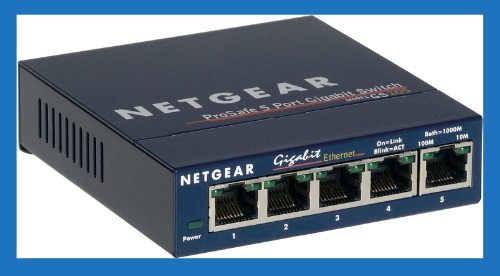
The NETGEAR GS105NA is a 5-port unmanaged Gigabit Ethernet switch designed for gamers who need a simple and reliable way to connect multiple wired devices. Its five 10/100/1000Mbps Ethernet ports can connect gaming PCs, consoles, streaming devices, smart TVs, and other network equipment.
We recommend the GS105NA as the Best Overall option for gamers who do not need multi-gigabit speeds or advanced network management. Its plug-and-play setup, compact metal design, fanless operation, and Gigabit connectivity make it a practical choice for expanding a home gaming network without complicated configuration.
Key Features
- 5 × 10/100/1000Mbps Gigabit Ethernet ports
- Unmanaged plug-and-play operation
- 10Gbps non-blocking switching capacity
- Fanless design for silent operation
- Durable metal housing
- Energy Efficient Ethernet (IEEE 802.3az)
- IEEE 802.1p QoS support
- Jumbo frame support
- Desktop or wall-mount installation
- No software or configuration required
Pros
- Five Gigabit Ethernet ports
- Simple plug-and-play setup
- Fanless and silent operation
- Durable metal enclosure
- Compact design
- Energy-efficient operation
- Suitable for gaming PCs and consoles
- Supports IEEE 802.1p QoS
Cons
- No 2.5GbE or faster ports
- No advanced network management features
- No PoE support
Final Verdict
The NETGEAR GS105NA is our Best Overall pick for gamers who want a simple and reliable Gigabit Ethernet switch without complicated configuration. Its five Gigabit ports, fanless design, durable metal housing, and plug-and-play setup make it well suited to gaming PCs, consoles, and other wired devices. However, gamers with multi-gigabit internet or high-speed local-network requirements should consider a 2.5GbE or faster switch instead.
2. D-Link DMS-105: Best 2.5GbE Value
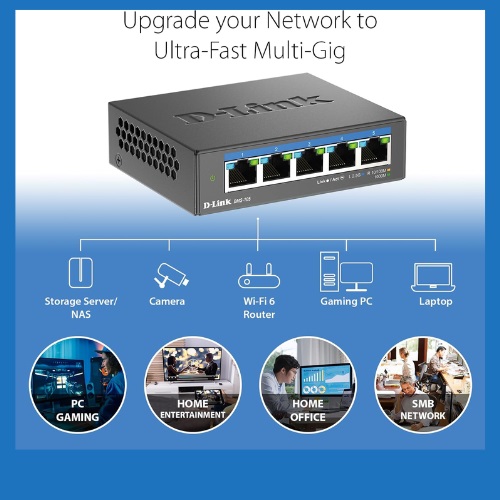
The D-Link DMS-105 is a 5-port unmanaged 2.5GbE switch designed for gamers who want faster wired networking without moving to a more complicated managed switch. All five Ethernet ports support speeds up to 2.5Gbps, making it suitable for gaming PCs, consoles, NAS devices, Wi-Fi 6 access points, and other multi-gigabit equipment.
We recommend the DMS-105 as the Best 2.5GbE Value because it combines multi-gigabit connectivity with a simple plug-and-play design. Its QoS and Flow Control features can help manage network traffic, while the fanless metal housing keeps the switch quiet during operation.
Key Features
- 5 × 10/100/1000/2.5Gbps Ethernet ports
- Up to 2.5Gbps per port
- 25Gbps switching capacity
- Unmanaged plug-and-play operation
- IEEE 802.1p Quality of Service (QoS)
- IEEE 802.3x Flow Control
- IGMP Snooping
- Fanless design for silent operation
- Durable metal housing
- IEEE 802.3az Energy-Efficient Ethernet
Pros
- Five 2.5GbE ports
- Faster than standard Gigabit Ethernet
- 25Gbps switching capacity
- Plug-and-play installation
- QoS and Flow Control
- IGMP Snooping
- Fanless and quiet operation
- Durable metal housing
- Suitable for gaming and high-speed home networks
Cons
- Only five Ethernet ports
- No advanced managed-switch features
- No PoE support
Final Verdict
The D-Link DMS-105 is an excellent choice for gamers who want to move beyond Gigabit Ethernet without dealing with a complicated network configuration. Its five 2.5GbE ports, 25Gbps switching capacity, QoS, fanless design, and plug-and-play setup make it a strong option for modern gaming and multi-gigabit home networks. However, if all of your devices are limited to 1GbE, a less expensive Gigabit switch may provide better value.
3. TP-Link TL-SG108: Best Budget 8-Port
The TP-Link TL-SG108 is an 8-port unmanaged Gigabit Ethernet switch designed for gamers who need more wired connections without spending too much. Its eight 10/100/1000Mbps ports can connect gaming PCs, consoles, smart TVs, streaming devices, and other network equipment.
We recommend the TL-SG108 as the Best Budget 8-Port option because it combines eight Gigabit Ethernet ports with a simple plug-and-play design. Its fanless construction keeps operation quiet, while features such as 802.1p/DSCP QoS, IGMP Snooping, and Flow Control make it a practical choice for expanding a home gaming network.

Key Features
- 8 × 10/100/1000Mbps Gigabit Ethernet ports
- 16Gbps switching capacity
- Unmanaged plug-and-play operation
- 802.1p/DSCP QoS
- IGMP Snooping
- IEEE 802.3x Flow Control
- Fanless design for quiet operation
- Store-and-forward switching
- Auto-negotiation and Auto MDI/MDIX
- Wall-mountable design
- Energy-efficient operation
Pros
- Eight Gigabit Ethernet ports
- Affordable option for larger gaming setups
- Simple plug-and-play installation
- 16Gbps switching capacity
- Supports QoS
- Supports IGMP Snooping
- Fanless and quiet operation
- Compact design
- Wall-mountable
Cons
- No 2.5GbE ports
- No advanced managed-switch features
- No PoE support
Final Verdict
The TP-Link TL-SG108 is a strong budget choice for gamers who need more Ethernet ports without requiring advanced network management. Its eight Gigabit ports, 16Gbps switching capacity, QoS support, fanless design, and plug-and-play setup make it suitable for connecting multiple gaming and entertainment devices. However, gamers with 2.5GbE or faster network equipment should consider a multi-gigabit switch instead.
4. D-Link DMS-107: Best Multi-Gig Value
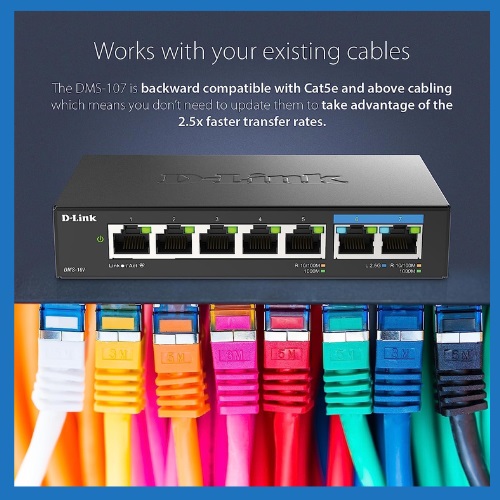
The D-Link DMS-107 is a 7-port unmanaged multi-gigabit Ethernet switch designed for users who want to add 2.5GbE connectivity without replacing all of their existing Gigabit devices. It includes five 10/100/1000Mbps Gigabit ports and two 10/100/1000/2.5Gbps ports, making it suitable for gaming PCs, consoles, NAS devices, Wi-Fi 6 access points, and other wired equipment.
We recommend the DMS-107 as the Best Multi-Gig Value because it combines two 2.5GbE ports with five standard Gigabit ports. This mixed-port design is useful for gamers who have one or two high-speed devices but still need several regular Gigabit connections. Its plug-and-play operation, fanless design, metal housing, and 20Gbps switching capacity make it a flexible choice for upgrading a home network.
Key Features
- 7 Ethernet ports
- 5 × 10/100/1000Mbps Gigabit ports
- 2 × 10/100/1000/2.5Gbps multi-gigabit ports
- 20Gbps switching capacity
- Unmanaged plug-and-play operation
- IEEE 802.1p QoS on Gigabit ports
- IEEE 802.3x Flow Control
- Fanless design for silent operation
- Durable compact metal housing
- IEEE 802.3az Energy-Efficient Ethernet
Pros
- Two 2.5GbE ports
- Five additional Gigabit ports
- 20Gbps switching capacity
- Useful for mixed Gigabit and multi-gigabit networks
- Plug-and-play installation
- Fanless and quiet operation
- Durable metal housing
- QoS support on Gigabit ports
- Suitable for gaming PCs
Cons
- Only two ports support 2.5GbE
- QoS is supported on Gigabit ports only
- No advanced managed-switch features
- No PoE support
Final Verdict
The D-Link DMS-107 is a strong choice for gamers who want to add 2.5GbE connectivity while keeping several existing Gigabit devices connected. Its combination of two 2.5GbE ports, five Gigabit ports, 20Gbps switching capacity, quiet fanless design, and plug-and-play operation makes it a versatile option for modern home networks. However, users who need 2.5GbE on every port should choose a fully multi-gigabit switch instead.
5. NETGEAR GS308E: Best Managed Option
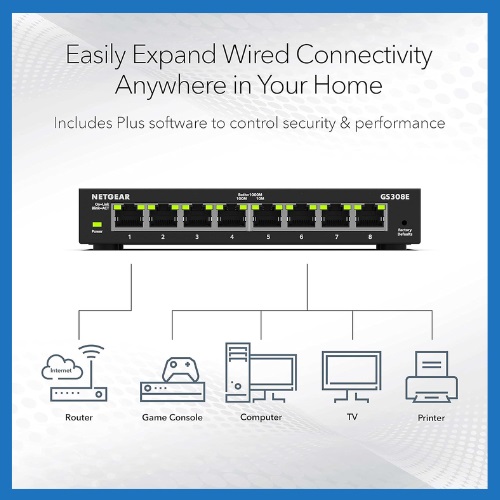
The NETGEAR GS308E is an 8-port Gigabit Ethernet Smart Managed Plus switch designed for users who want more control over their home network than a basic unmanaged switch provides. Its eight 10/100/1000Mbps Ethernet ports can connect gaming PCs, consoles, streaming devices, smart TVs, and other wired equipment.
We recommend the GS308E as the Best Managed Option for gamers and advanced home users who want features such as VLAN support, QoS, IGMP Snooping, rate limiting, and web-based configuration. It still provides a relatively straightforward setup, making it a useful choice when you want greater control over network traffic without moving to a more complex business-class switch.
Key Features
- 8 × 10/100/1000Mbps Gigabit Ethernet ports
- 16Gbps switching bandwidth
- Smart Managed Plus functionality
- Web-based management
- IEEE 802.1Q VLAN support
- Port-based VLAN support
- IEEE 802.1p QoS
- Rate limiting
- IGMP Snooping
- Link aggregation support is not available
- Fanless design for silent operation
- Energy Efficient Ethernet (IEEE 802.3az)
- Desktop or wall-mount installation
Pros
- Eight Gigabit Ethernet ports
- VLAN support
- QoS and traffic-management features
- IGMP Snooping
- Rate limiting
- Web-based management
- Fanless and silent operation
- Energy-efficient design
- Desktop or wall-mount installation
Cons
- No 2.5GbE or 10GbE ports
- More complicated than an unmanaged switch
- No PoE support
- Advanced features may be unnecessary for basic gaming setups
- Configuration requires some networking knowledge
Final Verdict
The NETGEAR GS308E is a good choice for gamers who want more control over their home network than a basic plug-and-play switch can provide. Its eight Gigabit ports, VLAN support, QoS, IGMP Snooping, rate limiting, and web-based management make it useful for more advanced gaming and home-network setups. However, users who simply need additional Ethernet ports for a gaming PC or console may save money and setup time with an unmanaged switch.
6. D-Link DMS-106XT: Best High-Speed Option
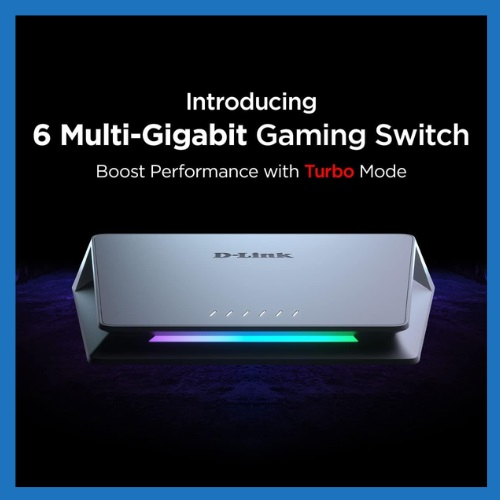
The D-Link DMS-106XT is a 6-port unmanaged multi-gigabit Ethernet switch designed for gamers and advanced home-network users who need higher wired speeds. It provides five 2.5GbE ports and one multi-gigabit port that supports speeds up to 10GbE, making it suitable for high-end gaming PCs, NAS devices, Wi-Fi 6 access points, and other bandwidth-intensive equipment.
We recommend the DMS-106XT as the Best High-Speed Option because it combines multiple 2.5GbE ports with a 10GbE-capable port. Its Turbo Mode adds port-based QoS prioritization for gaming and streaming, while the fanless aluminum design provides quiet operation. For gamers building a multi-gigabit home network, this gives considerably more headroom than a standard Gigabit switch.
Key Features
- 5 × 10/100/1000/2.5Gbps Ethernet ports
- 1 × multi-gigabit port supporting up to 10Gbps
- 45Gbps switching capacity
- Smart Turbo Mode
- Port-based QoS prioritization
- Plug-and-play unmanaged operation
- Fanless design for silent operation
- Durable aluminum alloy housing
- Jumbo frame support
- IEEE 802.3az Energy-Efficient Ethernet
Pros
- Five 2.5GbE ports
- One port supports up to 10GbE
- 45Gbps switching capacity
- Turbo Mode with port-based QoS
- Excellent for multi-gigabit networks
- Fanless and quiet operation
- Durable aluminum housing
- Plug-and-play installation
Cons
- More expensive than standard Gigabit switches
- Only one port supports up to 10GbE
- Requires compatible 2.5GbE/5GbE/10GbE devices to take advantage of higher speeds
- Six total ports may be limiting for larger networks
Final Verdict
The D-Link DMS-106XT is the strongest choice in this list for gamers who are building a high-speed multi-gigabit network. Its five 2.5GbE ports, 10GbE-capable port, 45Gbps switching capacity, Turbo Mode, and port-based QoS provide plenty of bandwidth for modern gaming PCs, NAS devices, and high-speed networking. However, it is more than most casual gamers need, especially if their existing devices and internet connection are limited to Gigabit Ethernet.
7. Zyxel GS-105S: Best for Compact Option
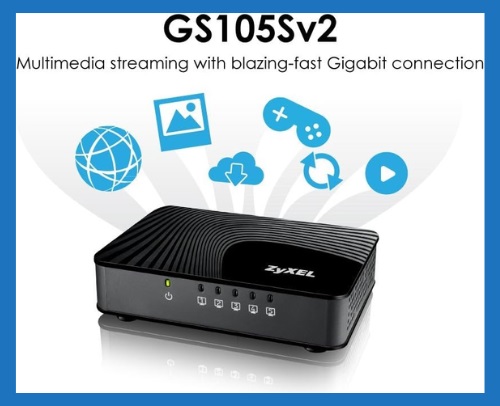
The Zyxel GS-105S is a 5-port unmanaged Gigabit Ethernet switch designed for users who need a simple way to connect gaming consoles, PCs, TVs, media players, and other wired devices. Its five 10/100/1000Mbps Ethernet ports provide Gigabit connectivity without requiring software configuration.
We recommend the GS-105S as the Best for Simple Gaming Setups because it focuses on straightforward wired connectivity rather than advanced network management. Its plug-and-play design, dedicated QoS prioritization, fanless operation, and energy-saving features make it a practical option for a basic home gaming network.
Key Features
- 5 × 10/100/1000Mbps Gigabit Ethernet ports
- 10Gbps non-blocking switching capacity
- Plug-and-play operation
- Port-based QoS support
- Dedicated high-, medium-, and low-priority QoS ports
- Auto MDI/MDIX
- IEEE 802.3x Flow Control
- Fanless design
- IEEE 802.3az Energy Efficient Ethernet
- Jumbo frame support up to 9KB
- Compact desktop design
Pros
- Five Gigabit Ethernet ports
- Simple plug-and-play setup
- Dedicated QoS prioritization
- Fanless and quiet operation
- Energy-saving design
- Compact form factor
- Suitable for gaming consoles and PCs
- Supports jumbo frames
- No complicated network configuration required
Cons
- No 2.5GbE or faster ports
- No advanced managed-switch features
- No PoE support
- Only five Ethernet ports
Final Verdict
The Zyxel GS-105S is a good choice for gamers who want a simple and affordable way to add wired Gigabit connections to their home network. Its five Gigabit ports, plug-and-play setup, QoS prioritization, fanless design, and energy-saving features make it suitable for gaming consoles, PCs, and other home entertainment devices. However, users with multi-gigabit internet or 2.5GbE devices should consider a faster switch instead.
How to Choose the Best Network Switch for Gaming?
1. Choose the Right Ethernet Speed
The first thing to consider is the network speed you actually need. A Gigabit Ethernet switch can provide up to 1Gbps per port and is sufficient for many gaming PCs, consoles, and home networks. If you have a multi-gigabit internet connection or compatible networking equipment, a 2.5GbE switch can provide more bandwidth.
For example, the NETGEAR GS105NA and TP-Link TL-SG108 are Gigabit switches, while the D-Link DMS-105 provides 2.5GbE connectivity. The D-Link DMS-106XT goes further with multiple 2.5GbE ports and a port supporting up to 10GbE.
For most gamers: Gigabit is enough.
For newer high-speed networks: Consider 2.5GbE or faster.
2. Decide How Many Ports You Need
Consider how many wired devices you want to connect now and how many you may add later. A 5-port switch can be suitable for a gaming PC, console, TV, and a few other devices. An 8-port model gives you more flexibility for multiple gaming and entertainment devices.
If you expect your network to grow, choosing a switch with additional ports can prevent you from needing another switch later.
3. Unmanaged vs. Managed Switch
For most gamers, an unmanaged switch is the easiest option. You simply connect the Ethernet cables and start using it without configuring the switch.
A managed or smart-managed switch provides additional control over network traffic and features such as VLANs and QoS. The NETGEAR GS308E, for example, is better suited to users who want more control over their home network.
A managed switch will give you better network security and flexibility than an unmanaged switch because a managed switch can be configured to custom-fit the network.
Choose unmanaged if: you want simple plug-and-play gaming connectivity.
Choose smart-managed if: you want greater control over network traffic and configuration.
4. Check Your Gaming Devices
A 2.5GbE switch is most useful when the devices connected to it also support 2.5GbE or faster Ethernet.
For example, if your gaming PC has only a 1GbE network port, connecting it to a 2.5GbE switch will not make that PC’s Ethernet connection operate at 2.5Gbps.
Before buying a multi-gigabit switch, check the Ethernet capabilities of your gaming PC, console, router, NAS, and other important devices.
5. Consider QoS for Busy Networks
Quality of Service (QoS) can help prioritize certain network traffic when multiple devices are using the network at the same time.
This can be useful if someone else is streaming video, transferring large files, or using other bandwidth-intensive applications while you are gaming.
However, don’t assume that QoS automatically reduces ping. Your latency also depends on factors such as your internet connection, router, ISP, game server, and physical distance from the server.
6. Check Switching Capacity
Switching capacity describes how much traffic the switch can handle across its ports.
For example, the D-Link DMS-105 has a 25Gbps switching capacity, while the DMS-106XT has 45Gbps. These numbers should not be confused with the speed of an individual Ethernet port.
When comparing switches, look at both:
- Individual port speed
- Overall switching capacity
This will give you a clearer picture of the switch’s networking capabilities.
7. Think About Noise and Placement
If your gaming setup is located in a bedroom, office, or other quiet area, a fanless switch can be a useful choice. Several switches in this list use fanless designs, including the NETGEAR GS105 and D-Link’s DMS-105 and DMS-106XT. This allows them to operate without adding fan noise to your gaming environment.
Also consider whether you want to place the switch on a desk or mount it on a wall.
8. Consider Future Network Upgrades
If you are building a new gaming network, think about what you may need in the next few years. A basic Gigabit switch can be perfectly adequate today, but gamers upgrading to multi-gigabit internet, faster NAS storage, Wi-Fi 6/7 networking, or high-speed local file transfers may benefit from 2.5GbE or 10GbE connectivity.
You don’t necessarily need to buy the fastest switch available. Choose a model that matches your current equipment and realistic upgrade plans.
9. Don’t Pay for Speed You Don’t Need
A faster switch isn’t automatically a better gaming switch. If your internet connection, router, and gaming devices are all limited to 1Gbps, a 10GbE-capable switch may provide little practical benefit for your current setup.
For a simple gaming network, a reliable Gigabit switch can be the better value. For a modern multi-gigabit setup, a 2.5GbE or faster switch makes more sense.
Which Type of Gaming Switch Should You Choose?
Your choice ultimately depends on your network:
| Your needs | Recommended type |
|---|---|
| Basic gaming PC or console setup | 5-port Gigabit switch |
| Several wired gaming devices | 8-port Gigabit switch |
| Multi-gigabit home network | 2.5GbE switch |
| Advanced network configuration | Smart-managed switch |
| High-speed gaming + NAS | Multi-gigabit switch |
| 10GbE networking | 10GbE-capable switch |
Frequently Asked Questions About Gaming Network Switches
Do I need a network switch for gaming?
You need a network switch if you want to connect multiple wired devices to your network and your router does not have enough Ethernet ports. A switch can connect gaming PCs, consoles, TVs, NAS devices, and other wired equipment while keeping your network organized.
Does an Ethernet switch improve gaming ping?
An Ethernet switch does not automatically reduce internet ping. However, a wired Ethernet connection can provide a more consistent connection than Wi-Fi, particularly when wireless interference or network congestion is an issue.
Your actual gaming latency also depends on your internet connection, router, ISP, game server, and distance from the server.
Is a Gigabit switch enough for gaming?
Yes. A Gigabit Ethernet switch is sufficient for many gaming setups. A 1Gbps connection provides more than enough bandwidth for online gaming, and it can also support other activities such as streaming and general internet use.
The NETGEAR GS105NA and TP-Link TL-SG108, for example, are Gigabit switches suitable for users who don’t need multi-gigabit networking.
Is a 2.5GbE switch better for gaming?
A 2.5GbE switch can be a better choice if your gaming PC, router, internet connection, or other network devices support speeds above 1Gbps.
However, you will not automatically get 2.5Gbps speeds simply by buying a 2.5GbE switch. The connected devices and network equipment must also support the higher speed.
How many ports do I need for a gaming setup?
A 5-port switch is usually enough for a small gaming setup with a PC or console and a few additional wired devices.
An 8-port switch is better if you have several gaming and entertainment devices or expect to expand your network later.
Are managed switches better than unmanaged switches for gaming?
Not necessarily. An unmanaged switch is usually better for gamers who want simple plug-and-play connectivity.
A smart-managed switch can be useful if you want features such as VLANs, QoS, traffic control, and greater control over your network. The NETGEAR GS308E is an example of a switch designed for users who want these additional management features.
What is QoS on a gaming network switch?
Quality of Service (QoS) allows a switch to prioritize certain types of network traffic. This can be useful when several devices are using the network simultaneously.
However, QoS does not guarantee lower ping or eliminate lag. Its usefulness depends on your network configuration and whether the network is experiencing congestion.
What is the difference between 1GbE and 2.5GbE?
A Gigabit Ethernet port supports speeds up to 1Gbps, while a 2.5GbE port supports speeds up to 2.5Gbps.
2.5GbE is useful when you have compatible devices and network equipment that can take advantage of the additional bandwidth. For a typical gaming setup using 1GbE equipment, a Gigabit switch may provide better value.
Do gaming switches need Wi-Fi?
No. A network switch connects devices using Ethernet cables and does not require Wi-Fi to operate.
Your router can provide internet access, while the switch expands the number of available wired Ethernet connections.
Can I use a 2.5GbE switch with Gigabit devices?
Yes. Most 2.5GbE switches support multiple Ethernet speeds, allowing compatible Gigabit devices to connect at their supported speed.
For example, a 2.5GbE switch can connect a 1GbE gaming console alongside a 2.5GbE gaming PC.
Is a 10GbE switch worth it for gaming?
For most gamers, probably not. A 10GbE switch becomes more useful when you have 10GbE-compatible devices, very fast internet, high-speed NAS storage, or large local file transfers.
If your gaming equipment is limited to Gigabit or 2.5GbE, a 10GbE switch may provide little practical benefit for gaming alone.
What is the best network switch for gaming?
The best choice depends on your network requirements. The NETGEAR GS105NA is a strong overall option for a simple Gigabit gaming network, while the D-Link DMS-105 is better suited to users who want 2.5GbE connectivity.
For users who need more ports, the TP-Link TL-SG108 provides eight Gigabit ports, while the D-Link DMS-106XT is designed for higher-speed multi-gigabit networks.
Read more
Conclusion
Choosing the best network switch for gaming depends on your internet speed, gaming devices, number of wired connections, and whether you need advanced networking features.
The NETGEAR GS105NA is our Best Overall choice for a simple and reliable Gigabit gaming setup. If you want faster 2.5GbE connectivity, the D-Link DMS-105 is a strong value option, while the TP-Link TL-SG108 is better suited to gamers who need eight affordable Gigabit ports.
For users who want a combination of Gigabit and multi-gigabit connections, the D-Link DMS-107 offers a flexible option. The NETGEAR GS308E is a better fit for users who want smart network-management features, while the D-Link DMS-106XT is the strongest choice for a high-speed multi-gigabit network. Finally, the Zyxel GS-105S is suitable for a straightforward gaming setup where basic Gigabit connectivity is all you need.
Before buying, check the Ethernet speed supported by your gaming PC, console, router, and internet connection. You don’t need the fastest switch available to get a good gaming experience—choose the switch that matches your current network and your realistic upgrade plans